一般情况下,单元格插入换行符可以使用Alt+Enter来实现
但如果需要批量操作的话,那么可以使用 **CHAR(10)**来表示换行符
实例如下,一看就懂!
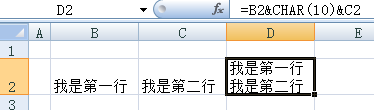
一般情况下,单元格插入换行符可以使用Alt+Enter来实现
但如果需要批量操作的话,那么可以使用 **CHAR(10)**来表示换行符
实例如下,一看就懂!
32-bit:
cd ~ && wget -O - "https://www.dropbox.com/download?plat=lnx.x86" | tar xzf -
64-bit:
cd ~ && wget -O - "https://www.dropbox.com/download?plat=lnx.x86_64" | tar xzf -
~/.dropbox-dist/dropboxd
按照提示,在浏览器中打开链接,确认授权。
下载执行脚本:
    wget https://www.dropbox.com/download?dl=packages/dropbox.py
    chmod +x dropbox.py
dropbox.py使用
    root@hkvps:~# ./dropbox.py help
    Dropbox command-line interface
    commands:
    Note: use dropbox help <command> to view usage for a specific command.

     status       get current status of the dropboxd
     help         provide help
     puburl       get public url of a file in your dropbox
     stop         stop dropboxd
     running      return whether dropbox is running
     start        start dropboxd
     filestatus   get current sync status of one or more files
     ls           list directory contents with current sync status
     autostart    automatically start dropbox at login
     exclude      ignores/excludes a directory from syncing
     lansync      enables or disables LAN sync
VC运行库全集
VC2005,VC2008,VC2010,VC2013
VC++ Redistributable Package Collection
VCRP:
    |
    +---vcpp_2005
    |       vcredist_x86.exe
    +---vcpp_2008
    |       vcredist_x86.exe
    +---vcpp_2010
    |       vcredist_x64.exe
    |       vcredist_x86.exe
    +---vcpp_2012
    |       vcredist_x64.exe
    |       vcredist_x86.exe
    |       vozqco_70591.exe
    \---vcpp_2013
        vcredist_arm.exe
        vcredist_x64.exe
        vcredist_x86.exe
VC运行库下载地址**https://ct.optipng.cn/fs/18418398-315802255**